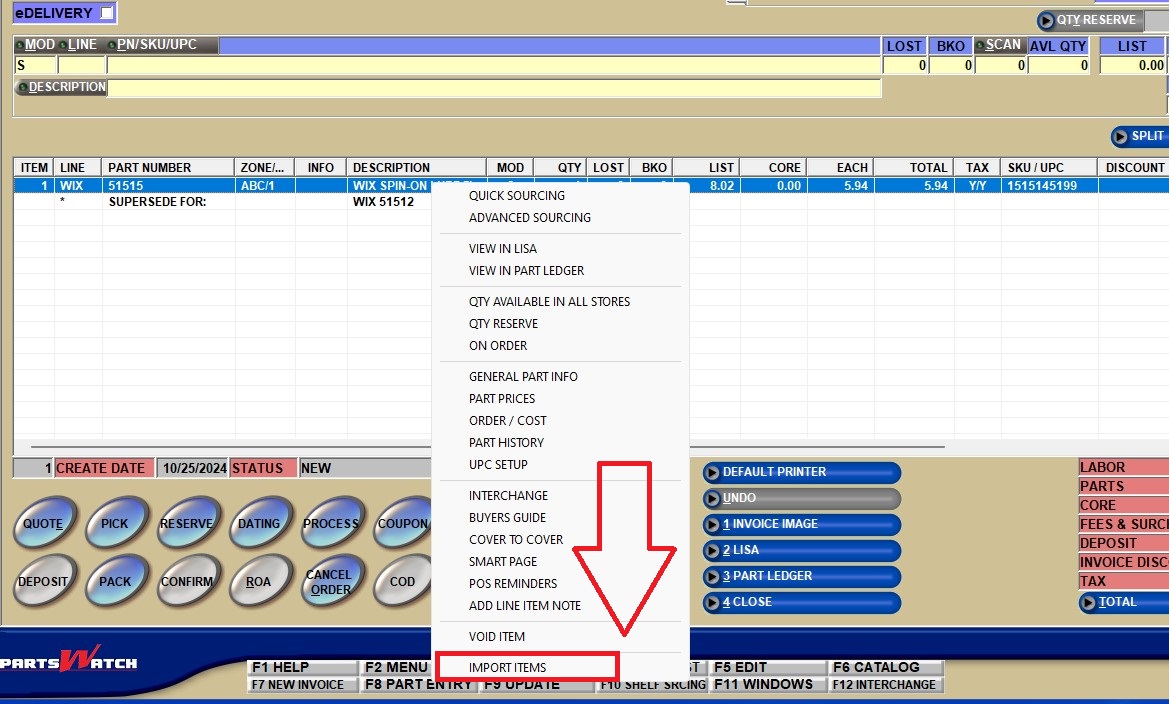
… you can import a list of parts from an input file (Microsoft Excel or CSV) into an existing sales order by right-clicking a line item on the existing INVOICE screen and selecting ‘IMPORT ITEMS’ from the drop-down menu (Menu Path: Invoicing, Invoice Screen).
Note: The User Security Proc ‘INVOICE IMPORT ITEMS’ on the USER SECURITY SETUP screen (Menu Path: Controls, System, User Security) needs to be set to ‘ALLOW EDIT’ in order for the ‘IMPORT ITEMS’ selection to be usable.
The file must include the following columns: ‘Line Code’, ‘Part Number’, and ‘Sell Quantity’, and can optionally include the ‘Sell Price’, which will be processed as an OVERSTRIKE edited price.
Note: If the invoice grid is empty, the ‘IMPORT ITEMS’ selection will be the only right-click menu item.
Click here to access the FSD to learn more about the feature.